At a glance
- Price: the MainWP core is free with no site limit. MainWP Pro costs $29 a month, $199 a year or $599 once (late 2026 prices).
- What it is: a dashboard you host yourself that updates, monitors and backs up many WordPress sites from one screen.
- New in 6.4: built-in backups to S3, Cloudflare R2, Backblaze B2, Google Cloud Storage, Dropbox or SFTP, still labeled beta.
- How we use it: a person reviews every update, staging sites go first, and uptime alerts go to our support queue.
- Alternatives: ManageWP, WP Umbrella and InfiniteWP, plus host tools like Cloudways Site Manager and the free GoDaddy Pro Hub.
- Best for: anyone looking after more than a handful of sites. With two or three sites on one host, your host’s tool may be enough.
Learning to manage multiple WordPress sites usually starts the same way: one site, then a second, then a staging copy of each, and soon a list of logins nobody fully trusts.
The practical way to manage multiple WordPress sites is a single dashboard that shows updates, uptime and backups for every site in one place. We use MainWP, a self-hosted dashboard with a free core, so our data stays on our own server. Standalone and host-built tools are fair alternatives for some owners.
Prices and features below are as of late 2026. Vendors change them often, so check each link.
What Goes Wrong When You Run Several WordPress Sites?
The trouble is rarely one big failure. It is a pile of small chores that never get done on the same day.
- Updates by hand. WordPress core, plugins and themes all need updates, which means logging into every site and clicking through the same screens.
- Missed plugin updates. A plugin update that sits for weeks is a common way a site gets hacked.
- A site goes down and nobody notices. If a customer is the first to see it broken, you hear about it late.
- Backups nobody has tested. A backup you have never restored is a hope. Many people learn it was empty on the day they need it.
- Staging and live copies get mixed up. A staging site is a private copy used to try changes before they reach the public site. In a long list, it is easy to run a bulk action on the wrong one.
- No record of who changed what. Three months later, nobody can say which site got which update, or when.
None of this is hard. It is tedious, and tedious work gets skipped.
What Is MainWP and How Does It Work?
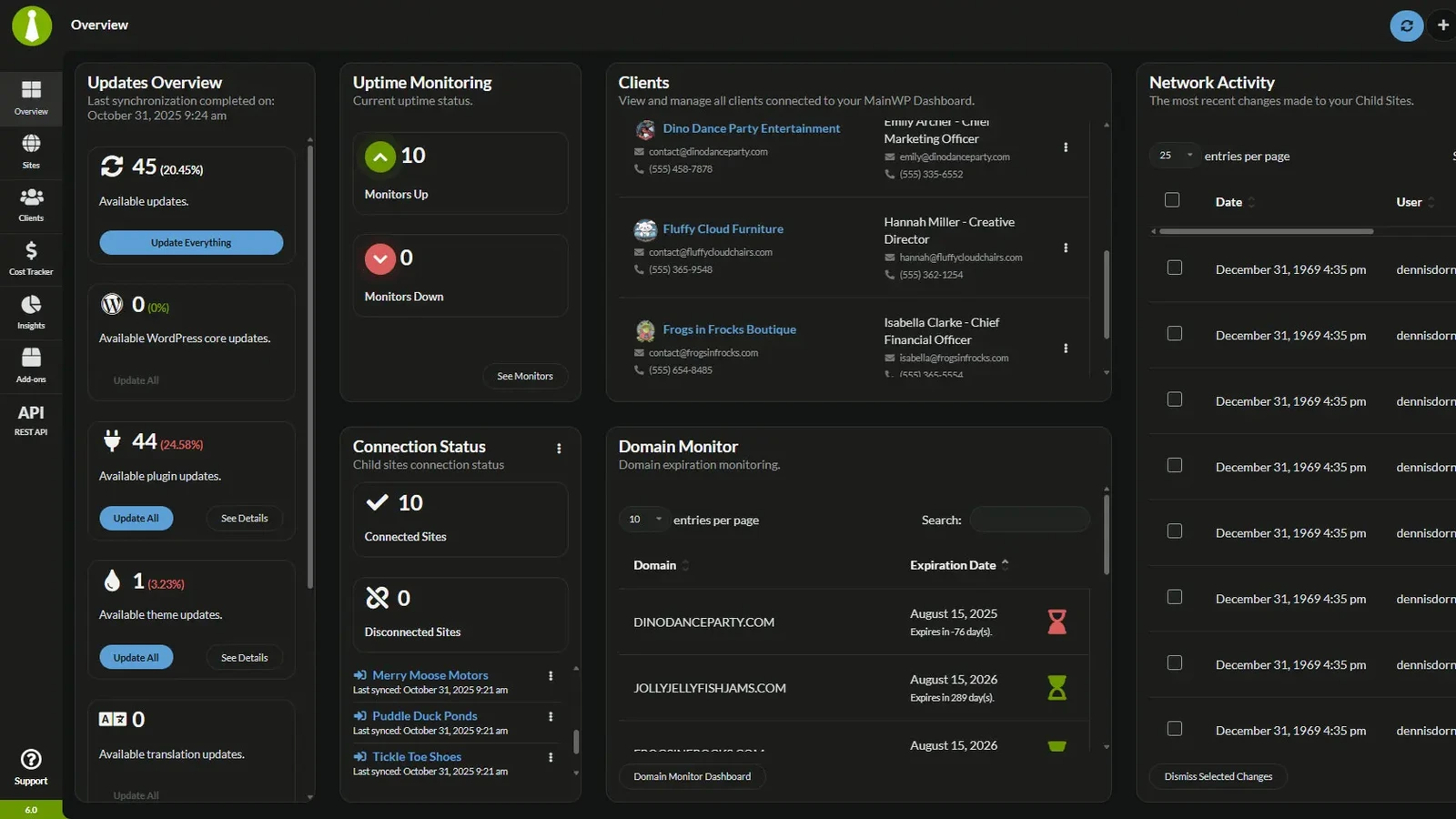
MainWP is a WordPress site manager you host yourself. The Dashboard is a plugin installed on a WordPress site you control. The Child plugin goes on each site you want to manage (a “child site”). Once connected, the Dashboard lists every child site and lets you act on many at once. MainWP’s pre-install FAQ advises keeping the Dashboard off any client site, and there is no site limit in the software.
- Open source. MainWP is GPL-3.0 licensed, and its code is public on GitHub.
- Your data stays with you. On its about page, MainWP says it does not collect or store information about your clients’ sites.
- A free core. The free versus Pro page lists updates for core, plugins, themes and translations, uptime monitoring, Site Health, security checks, a cost tracker, client profiles, backups, a REST API, WP-CLI and an MCP server.
- A paid Pro tier. As of late 2026, MainWP Pro costs $29 a month, $199 a year or $599 for a lifetime license. It adds client reports, Lighthouse, Team Control and advanced security integrations.

New in MainWP 6.4: Built-In Backups
Version 6.4, released in late October 2026, added built-in backups to the free core. Backups can go to S3, Cloudflare R2, Backblaze B2, Google Cloud Storage, Dropbox or SFTP, are encrypted, and include a weekly automatic test restore. That answers the “backups nobody has tested” problem directly, without a separate backup plugin. MainWP labels the feature beta at launch, so our plan is to prove it on staging sites before trusting it with live ones.
How Does Steven Digital Use MainWP?
The Dashboard lives on our own server, away from every client site. If a client site is ever compromised, the thing that controls the others is not sitting next to it. Every client site we look after is connected to it, along with its staging copy.
Staging copies sit in their own group. MainWP’s “Update All” does not know a staging site from its production twin. Groups fix that. We aim a bulk action at staging first, check the result, then run it on production.
Automatic updates are off on purpose. An update that fires at 3 a.m. can break a contact form, and nobody finds out until a lead does not arrive. We review updates and run them ourselves, so a person has looked at the change before it reaches a live site.

Uptime monitoring runs on every site, and the alerts go to our support queue. They do not land in one person’s inbox, so a vacation or a full mailbox cannot hide an outage from the team.

We push our own plugins in one upload. When one of our in-house plugins gets an update, we upload it once from the Dashboard and it goes to every site.
We keep a 30-day action log of what was done on which site.
Our AI tooling can read update status, in safe mode. MainWP released a free MCP server in July 2026 that works with Claude, Cursor, Codex and VS Code. We connected it so our assistants can read update status across all sites. In safe mode, destructive actions are refused.
MainWP is one of a short list of tools we use and recommend, and the rest of that list lives on our Tools page.
What Changes for a Business Whose Site We Manage?
You never log into the Dashboard, and most owners never need to know it exists. What you notice is the result.
- Updates are reviewed before they run. A person on our team has read what is changing and chosen when it goes live.
- Outages reach us. Monitoring does not prevent an outage, and no one can promise a site never goes down, but it shortens the time before someone knows.
- One place to see every site. “Which sites still run that old plugin?” becomes a look at one screen instead of an afternoon of logins.
- Your data stays on our server. The management layer is not a vendor’s cloud service.
- There is a record of what was done, where, and when.
This is the engine behind the maintenance side of our website services and the ongoing care that comes with our SEO and AI search work. The dashboard does not replace judgment; it removes the busywork around it. You can meet the team on our about page.
What Are the Other Options for Managing WordPress Sites?
MainWP is not right for everyone. The alternatives fall into two groups.
Standalone Site Managers
- ManageWP is a cloud dashboard with a free core and per-site add-ons, such as backups at $2 and uptime at $1 per site per month. Nothing to host is its strength; cost grows with every site, and your data sits on their servers.
- WP Umbrella charges about EUR 1.99 per site per month, with backups, uptime, vulnerability checks and white-label reports included. Simple and predictable, but it is a per-site cost and a third-party home for your data.
- InfiniteWP is self-hosted like MainWP, with yearly licenses from $147 for 10 sites to $647 for unlimited. It suits self-hosters who do not mind site caps and yearly fees.
- WPMU DEV’s The Hub is a hosted dashboard tied to WPMU DEV’s plugins and hosting, with a free Hub that has restrictions. It fits if you already use their plugin suite, and less so if you want to avoid lock-in.
- WP Remote is a hosted service from the BlogVault family with safe updates that use visual regression tests (screenshots compared before and after an update). We have not confirmed its prices, so we quote none.
Tools Built Into a Host
- Cloudways Site Manager has a free tier with a dashboard, quick updates, single sign-on and limited bulk actions. Pro costs $3 per app per month for 1 to 5 apps and $2 for 6 or more, and adds Safe Updates with visual regression testing. It is documented for Cloudways-hosted apps only. Breeze, the Cloudways cache plugin, is not a site manager.
- GoDaddy Pro Hub is free, built on ManageWP technology, and handles bulk updates for sites hosted anywhere.
- WP Engine Smart Plugin Manager runs scheduled updates with a visual comparison and rollback, for sites on WP Engine hosting.
- Kinsta includes bulk updates in MyKinsta for sites hosted there. Its Automatic Updates add-on costs $3 per environment per month.
| Tool | Runs on | Rough cost | Best for |
|---|---|---|---|
| MainWP | Your server | Free core; Pro from $29/mo | Control, no per-site fees |
| ManageWP | Their cloud | Free core plus add-ons | Hosting nothing yourself |
| WP Umbrella | Their cloud | About EUR 1.99/site/mo | One simple price |
| InfiniteWP | Your server | $147 to $647/yr | Self-hosters, capped sites |
| Cloudways Site Manager | Cloudways | Free; Pro $2 to $3/app/mo | Sites already on Cloudways |
| GoDaddy Pro Hub | Their cloud | Free | Free bulk updates, any host |
MainWP publishes its own comparisons against ManageWP, WP Remote and InfiniteWP. Remember who wrote them.
Where a competitor fits better: if you run three sites on one host, that host’s tool may be all you need, and it costs nothing extra. If you would rather run no server at all, a hosted manager removes that job.
Who Should Use MainWP?
MainWP suits agencies, freelancers and in-house teams who look after more than a handful of WordPress sites, often across hosts, and want the management layer and its data on their own server. It also suits anyone avoiding per-site fees.
It is probably the wrong pick if you have two or three sites on one host with a decent built-in tool, or nobody comfortable keeping a WordPress install updated. A self-hosted dashboard is one more site to look after.
For a business owner, the better question is “who looks after my site, and how will I know?”
FAQ
Is MainWP Really Free?
The core plugin is free with no site limit, and it includes updates, uptime monitoring, Site Health and built-in backups. A paid Pro tier adds client reports and Lighthouse. As of late 2026 Pro costs $29 a month, $199 a year or $599 once.
What Is a Child Site in MainWP?
A child site is any WordPress site connected to your MainWP Dashboard through the Child plugin. The Dashboard is the control panel; each child site is one it manages.
Is It Safe to Turn On Automatic WordPress Updates?
It depends on the site. Automatic updates save time, but an unreviewed update can break a form or plugin on a live site. We keep them off and review updates ourselves, trying bulk work on staging first.
Do I Need a Site Manager If I Only Have One WordPress Site?
Usually not. One site is fine with the updates and backups from your host or a maintenance plan. A dashboard pays off once you juggle several sites, or a live site plus staging.
Next Step
If you would rather not think about updates and backups, we can take that on. Book a free strategy call and we will talk through how we would look after your site, starting from our website services.